
Like most Roblox executors available for Android, Delta Executor also requires a key to activate and run your favorite scripts — without it, the tool won’t function properly.
After downloading Delta Executor, generating the required key is quite simple. You just need to complete a few quick steps on a third-party site called Linkvertise.com.
If you’re facing difficulties obtaining the key, don’t worry — we’ve prepared a detailed, step-by-step walkthrough to help you get your Delta key within minutes.
So, without wasting any more time, let’s dive right in.
How the Delta Key System Works on Android & iOS
The Delta Executor’s key mechanism is a built-in safety layer that helps secure usage and prevent abuse on both Android and iOS.
On Android, the key is embedded into the APK itself. Installing the Delta APK ties the key mechanism to your device identifier, blocking unauthorized copies or tampered builds from running scripts. For this reason it’s important to launch the Delta app at least once after installation (even before opening Roblox) — that first run initializes the key system and readies the device for script execution.
On iOS, key handling is browser-based rather than app-based. Delta’s iOS flow generates keys through a web gate tied to your Safari session, so there’s no app install involved. Because the iOS keys are generated in-browser they can be more fragile — switching apps or closing Safari mid-process may invalidate the key. To avoid interruptions, finish the entire key-generation sequence in Safari and go straight to injecting scripts without leaving the browser.
How To Get the Delta Executor Key – Delta Android Key System Guide
This method is safe to follow. Before you begin, confirm the executor is installed on your Android device (or on your PC through an emulator).
- Open Delta on your phone — its icon resembles the Roblox logo.
- Log into your Roblox account (sign in or create one), then join any game.
- A prompt will appear — tap Copy Link, open your browser, and paste the link there.
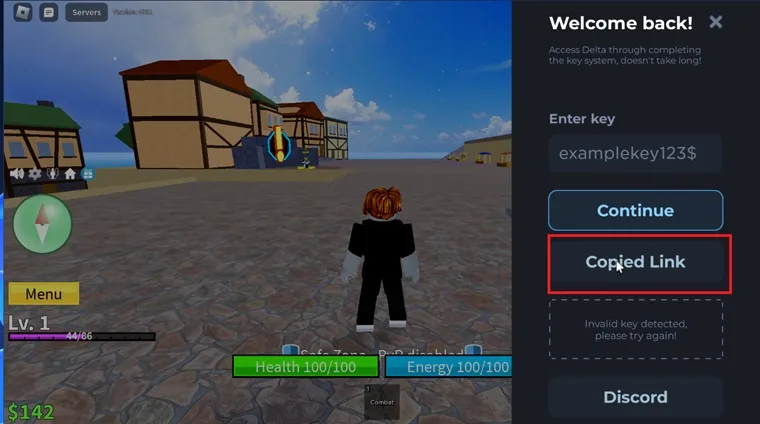
- You’ll be presented with two choices: Continue immediately, or watch an explanatory video about obtaining the Delta key.
- Selecting Continue takes you to a Linkvertise page.
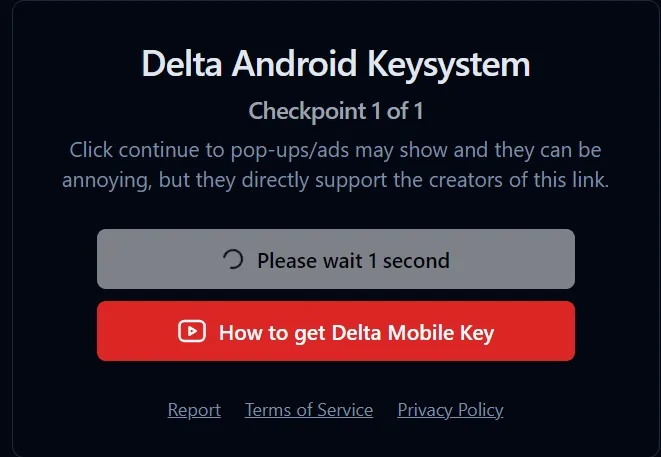
- Complete the short task shown (usually involves visiting and browsing the linked site).
- After finishing the task you’ll get a confirmation indicating the executor has been whitelisted.
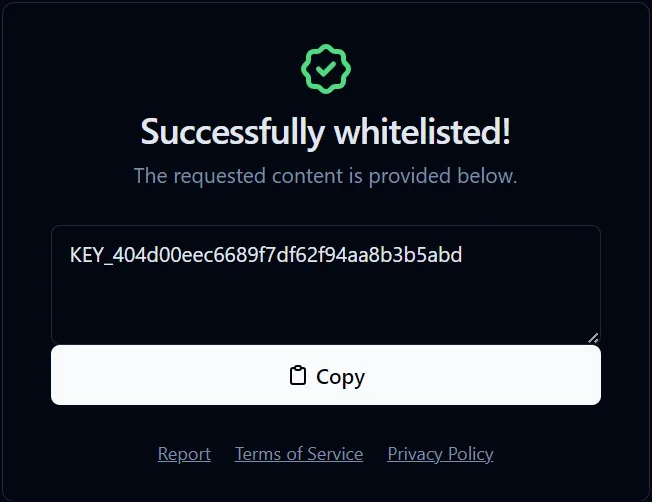
- Copy the key provided, return to the Delta app, and tap Continue — the key will be pasted automatically.
Once these steps are complete and the key is applied, Delta will be activated and you’ll be able to run scripts.
Troubleshooting & FAQs – Fix Common Delta Key Generation Problems
1. Stuck in the Linkvertise Loop (Not Redirecting to Key Page)
If you’re stuck and can’t reach the key page, it’s usually due to one of the following:
- An ad blocker or VPN is enabled.
- Your browser is blocking pop-ups or tracking scripts.
- You’re clicking through steps too quickly (Linkvertise monitors engagement).
How to Fix:
- Disable your ad blocker or open the page in Incognito mode.
- Go through each step slowly (usually 2–3 actions) — wait for any scroll or timer prompts.
- Avoid using in-app browsers like those in Discord or Telegram. Use Chrome (Android/PC) or Safari (iOS).
Tip: Still stuck? Clear cookies, restart your browser, and try again.
2. Key Says “Invalid” or “Expired” After 24 Hours
Each Delta key is only valid for 24 hours. When Roblox updates or your IP refreshes, old keys can stop working.
How to Fix:
- Revisit the official key page.
- Repeat the same steps to get a new key.
- Use the same IP address, device, and browser to avoid mismatches.
Note: Rebooting your device or switching from mobile data to Wi-Fi can cause your key to expire prematurely.
3. Can I Skip Linkvertise Ads? Is It Safe?
We understand the ads can be annoying, but they help keep Delta Executor free and actively updated.
Avoid Unsafe Methods:
- Chrome extensions that claim to “auto-skip” or “unlock” keys.
- YouTube or Telegram “hacks” that may contain malware.
- Third-party APKs claiming to have “pre-unlocked” executors.
Safe Alternatives:
- Simply wait 5–10 seconds per step — it’s the safest and quickest option.
- Join the official Delta Discord and request a supporter role (some users get direct access).
- PC users don’t need a key at all — see below.
4. Why PC Users Don’t Need a Key
The Windows version of Delta Executor is completely keyless because:
- It doesn’t rely on Roblox Mobile’s sandbox system.
- It uses a direct DLL injection method with lower detection risk.
- Desktop environments are more secure (no sideloading or app switching).
Just download Delta Executor for PC, launch it, and inject your scripts — no keys or ads required.
5. “Too Many Requests” Error on Linkvertise
If you see “Too many requests” or “Rate limit reached,” it’s often because of:
- Refreshing the page too many times.
- Switching devices or IPs mid-process.
- Trying to skip steps using tabs or shortcuts.
How to Fix:
- Keep the same IP throughout the process.
- Wait 10–15 minutes before retrying.
- Use a private/incognito window to reset your session.
6. Using the Same Key on Multiple Devices
Not possible. Each key is linked to your device and browser session.
Your key becomes invalid if you:
- Switch devices (e.g., phone to PC).
- Use a different browser.
- Clear cookies or reset your browser data.
7. Delta Key Taking Too Long to Generate
If the “Generating Key…” page keeps loading endlessly, it’s likely caused by:
- Slow internet connection.
- Ad blockers or VPNs interfering with Linkvertise.
- Server delays from the Delta key system.
Fix:
- Turn off any VPN or ad blocker.
- Wait 10–20 seconds per step before clicking “Continue.”
- Use Chrome (Android/PC) or Safari (iOS) for best performance.